
You hand your card across a table, the recipient opens their phone camera, and the optical character recognition (OCR) misreads the digit "0" in your email address as the letter "O". The connection dies before it even begins. As networking moves offline to online, professionals are evaluating different types of business cards to bridge the gap between physical introductions and digital persistence. The dividing line between an effective credential and a wasted one is no longer paper quality, but data routing: whether the hardware you hand over delegates the contact transfer to a native smartphone process, or leaves the recipient to do the data entry themselves.
Quick Summary
Modern professional networking relies on credentials that transfer contact data natively into a recipient's smartphone rather than requiring manual entry. The primary shift is from static printing to dynamic routing, where physical cards or digital wallet passes serve as trigger mechanisms for hosted contact profiles.
- Standard paper relies entirely on camera OCR to bridge the physical-digital divide.
- Digital wallet passes use native iOS and Android infrastructure to update contact details remotely.
- NFC and flex cards trigger native browser redirects via close-proximity radio frequencies.
- PCB credentials use fiberglass and copper trace manufacturing to signal technical capability while housing NFC payloads.
Table of Contents
- Why static printing limits professional networking
- 1. The standard business card
- 2. Digital wallet cards
- 3. NFC and the flex business card
- 4. The PCB business card
- How dynamic routing processes the connection
- Where hybrid networking hardware breaks down
- Comparison Table
- FAQ
- Recommended Reads
Why static printing limits professional networking
The fundamental flaw in historical networking media is the decay rate of static data. When a phone number, job title, or calendar booking link changes, the physical inventory bearing the old data becomes a liability. A recipient who pulls a card from a drawer six months after a conference has no way to verify if the printed email address is still active.
Modern networking solves this by separating the hardware from the payload. The credential you present - whether an NFC tap, a QR scan, or an Apple Wallet pass - no longer holds the data itself. Instead, it holds a routing instruction. The hardware instructs the recipient's phone to query a centralized hub, which serves the current contact file, social links, and lead-capture forms. This architecture means you can deploy your inventory once and alter the destination infinitely, ensuring the recipient always receives your present-day contact parameters rather than historical ones.
1. The standard business card
The standard business card remains the baseline for professional introductions. Typically printed on 16pt to 32pt cardstock using CMYK offset or digital printing, its mechanics rely entirely on human reading or device-level OCR.
Because standard cards lack internal routing technology, they force the recipient's device to interpret the printed ink. Modern iOS and Android native cameras feature live text extraction, allowing users to point their lens at a card and tap recognized fields. However, this bridge is fragile. When designers layer spot UV finishes over critical contact information, the resulting glare blinds the camera's OCR. Similarly, heavily stylized fonts, low-contrast ink colors, or layouts where the company logo intermingles with the email address consistently cause text extraction failures.
If you deploy standard paper, the typography must prioritize machine readability over aesthetic complexity. A high-contrast, sans-serif block of contact data positioned away from the edges and logos ensures the smartphone camera can cleanly parse the string and prompt the user to "Create New Contact." Understanding how to create a digital business card for modern professional networking in 2026 often begins by acknowledging where analog paper fails the camera test.
2. Digital wallet cards
Digital wallet passes bypass physical hardware entirely, utilizing the native wallet applications already installed on billions of smartphones (Apple Wallet and Google Wallet).
Mechanically, a wallet pass is a cryptographically signed .pkpass file - a compressed archive containing a JSON dictionary of text fields, branded image assets, and a scannable QR code. When you share this pass, the recipient saves it directly alongside their boarding passes and credit cards. The primary engineering advantage here is remote updateability. If your job title changes, your server sends an APNs (Apple Push Notification service) payload to the recipient's device. The device silently queries the server, downloads the updated pass.json, and updates the credential inside the recipient's wallet.
This creates a persistent, updateable presence on the recipient's device without requiring them to install a proprietary application. When they need to introduce you to someone else, they simply open the pass and present your QR code. For professionals auditing modern business card styles: how aesthetics and texture drive professional branding, the digital wallet pass removes texture entirely, replacing tactile weight with the friction-free utility of the smartphone operating system.
Practical rule: Never deploy a digital wallet pass without a prominently displayed QR code. The pass itself lives on your device or your contact's device, but the QR code is the mechanical bridge that allows a third party to scan it and trigger the contact download without requiring NFC handshakes.
3. NFC and the flex business card
Near Field Communication (NFC) hardware embeds a passive microchip and a coiled antenna into a physical substrate. Operating at a frequency of 13.56 MHz, the chip requires no internal battery; it draws induction power from the recipient's smartphone when placed within a few centimeters.
The industry standard for these chips is the NTAG series (such as NTAG213 or NTAG215). Because these chips have severe memory limits (often holding just 144 to 504 bytes), they cannot store a comprehensive contact file with a profile image. Instead, the chip is encoded with an NDEF (NFC Data Exchange Format) URI record - a simple web link. Tapping the card instructs the phone's operating system to open that link in the default browser.
Hardware durability is the primary failure mode for NFC credentials. Rigid PVC plastic cards snap when sat upon in a back pocket, severing the delicate copper antenna loop inside. This has driven the adoption of the flex business card, which utilizes a PET (polyethylene terephthalate) substrate. A flex business card bends under pressure without breaking the internal circuitry, dramatically extending the lifespan of the credential in rigorous networking environments.
4. The PCB business card
A PCB business card uses the manufacturing processes of printed circuit boards to create a credential that signals deep technical competence. Rather than paper or PVC, the substrate is typically FR-4 fiberglass, layered with copper traces and covered in a solder mask.
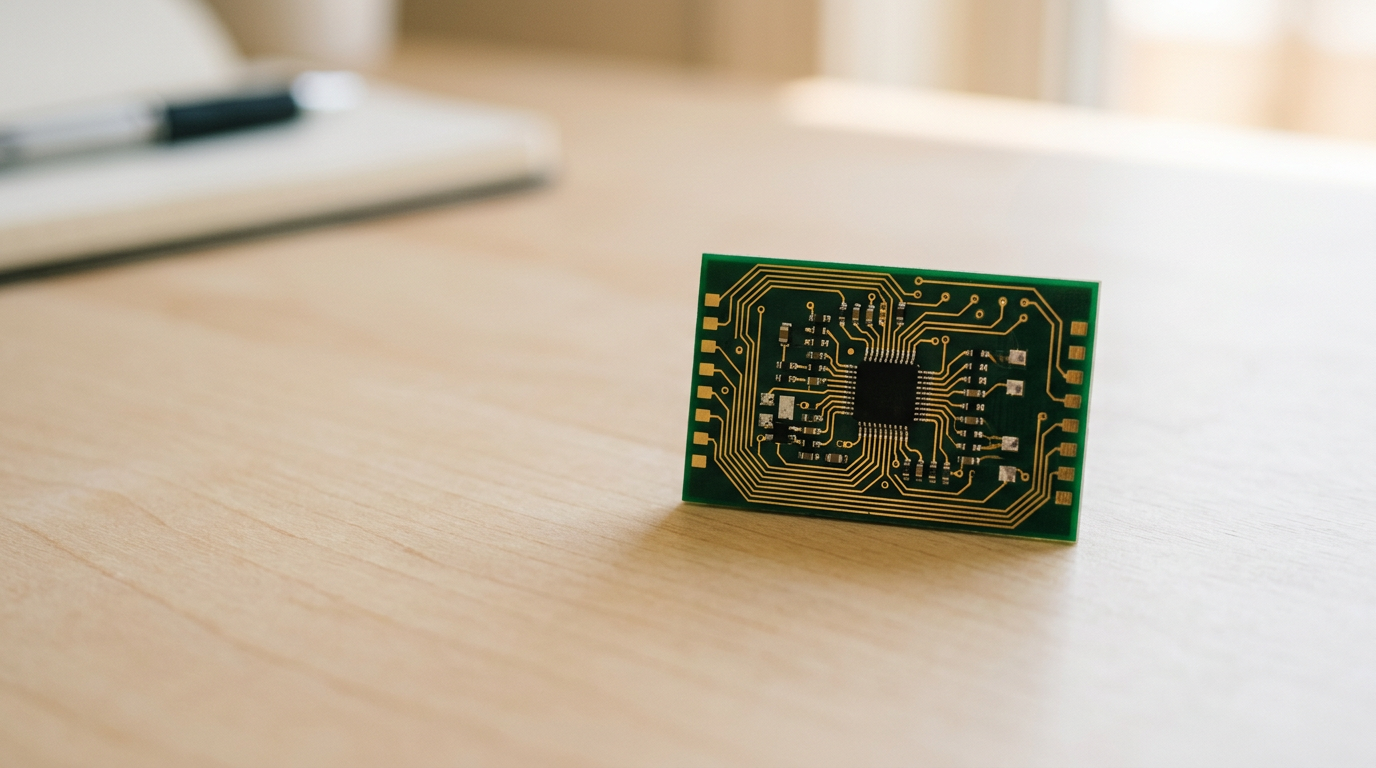
These credentials function identically to other NFC cards - housing an NDEF-encoded chip - but their aesthetic is derived entirely from electronics engineering. The exposed copper is treated with surface finishes like ENIG (Electroless Nickel Immersion Gold) or HASL (Hot Air Solder Leveling) to prevent oxidation, while the text is applied using the board's silkscreen layer.
The trade-off is production cost and tactile hostility. PCB fabrication is significantly more expensive per unit than printing PVC, and the raw cut edges of FR-4 fiberglass can be sharp if not aggressively milled or sanded. It is a highly specific format suited for hardware engineers, cybersecurity professionals, or technical founders who need the medium to actively demonstrate their domain expertise. For most other roles, the harsh industrial aesthetic creates friction rather than trust.
How dynamic routing processes the connection
Regardless of the hardware - be it a flex card, a PCB, or a wallet pass - the mechanism that actually processes the connection is the dynamic routing hub.
When a recipient scans your QR code or taps your NFC chip, their phone executes a GET request to the URL stored on your credential. Instead of serving a static .vcf file directly, modern systems route the user to a mobile-optimized Document Object Model (DOM), often called a smart page or link-in-bio hub.
This intermediate step is crucial for two reasons. First, it allows the host to execute analytics scripts, capturing UTM parameters to record exactly when and where the card was scanned. Second, it shifts the friction of the .vcf (vCard) download. iOS Safari handles contact files clumsily, requiring the user to tap the file, scroll down to "Create New Contact," and tap "Done" to commit the data. If users are distracted midway, the contact is lost. By landing the recipient on a hosted hub first, you present a persistent interface with social links, payment gateways, and lead-capture forms, ensuring that even if they abandon the vCard download, they can still engage with your professional presence. For a deeper look at this architecture, analyzing the anatomy of professional business cards: essential elements for 2026 clarifies why the destination matters more than the trigger.
Practical rule: Always format your downloadable contact payload using the vCard 3.0 or 4.0 schema. Older schemas fail to natively map modern social media handles (like LinkedIn or GitHub profiles) into the correct fields inside the iOS and Android native Contacts applications.
Where hybrid networking hardware breaks down
The reliance on smartphones and cloud infrastructure introduces failure modes that paper never faced. You must anticipate three distinct environmental breakdowns when deploying modern networking credentials.
First is the captive portal problem. At major trade shows and conferences, cellular networks saturate, and the venue Wi-Fi requires users to accept terms of service via a captive portal. If a recipient taps your NFC card while their phone is stuck behind a captive portal, the browser redirect will hijack the request, failing to load your profile.
Second is the hardware occlusion problem. Thick smartphone cases, particularly those containing metal plates for magnetic car mounts, block the 13.56 MHz frequency required for NFC handshakes. You will frequently encounter recipients whose phones simply fail to react to an NFC tap. To circumvent this, every piece of physical hardware must feature a fallback mechanism. Integrating creative QR code integration for modern business cards directly onto the NFC card ensures that when the radio frequency fails, the optical camera can still bridge the gap.
Third is the permission barrier. Corporate mobile device management (MDM) profiles often lock down background NFC reading and restrict Safari from downloading executable files, including .vcf contact cards. In these highly secure enterprise environments, dynamic routing must fall back to manual data entry, requiring your smart page to display your email and phone number in plain, copyable text.
Comparison Table
| Credential Format | Data Updateability | Hardware Dependency | Primary Failure Mode | Professional Signal |
|---|---|---|---|---|
| Standard Paper | None (Static) | None | OCR text extraction failure | Traditional, conventional |
| Digital Wallet Pass | Push Notification | Apple/Google Wallet app | Recipient deletes the pass | Digital-first, frictionless |
| NFC / Flex Card | Dynamic Redirect | Recipient's NFC antenna | Blocked by metal phone cases | Modern, efficient |
| PCB Card | Dynamic Redirect | Recipient's NFC antenna | Physical edge wear, cost | Highly technical, niche |
FAQ
Can an NFC business card hold my entire contact file without an internet connection?
Technically yes, but practically no. While you can encode a raw vCard onto an NFC chip, standard NTAG215 chips lack the memory capacity to hold profile photos or extensive notes. Furthermore, updating that data requires physically reprogramming the chip, defeating the purpose of dynamic networking.
Why do some phones fail to read NFC business cards?
The two most common culprits are hardware occlusion (metal phone cases blocking the induction loop) and software locking (the phone screen is off, or the camera app is open, which temporarily disables background NFC polling on many devices).
What happens to my digital wallet pass if the recipient switches from iPhone to Android?
The Apple Wallet .pkpass format is the industry standard and is heavily supported by Android. When an Android user taps a link for a .pkpass file, Google Wallet natively parses the file and imports the pass seamlessly.
Is the flex business card more durable than rigid PVC?
Yes. Rigid PVC is prone to micro-fractures when placed under bending stress (such as sitting on a wallet). Flex cards use PET materials that bend without snapping the internal copper antenna traces, making them significantly more durable for daily carry.